Most cross-platform tools are not actually multiplatform.
When a developer wants to share code across Android and iOS, they usually face a choice between Flutter, React Native, and Kotlin Multiplatform. This choice often feels like a trade-off between development speed and app performance. To understand why this trade-off exists, you must look at what these tools actually put inside the app.
The engine problem
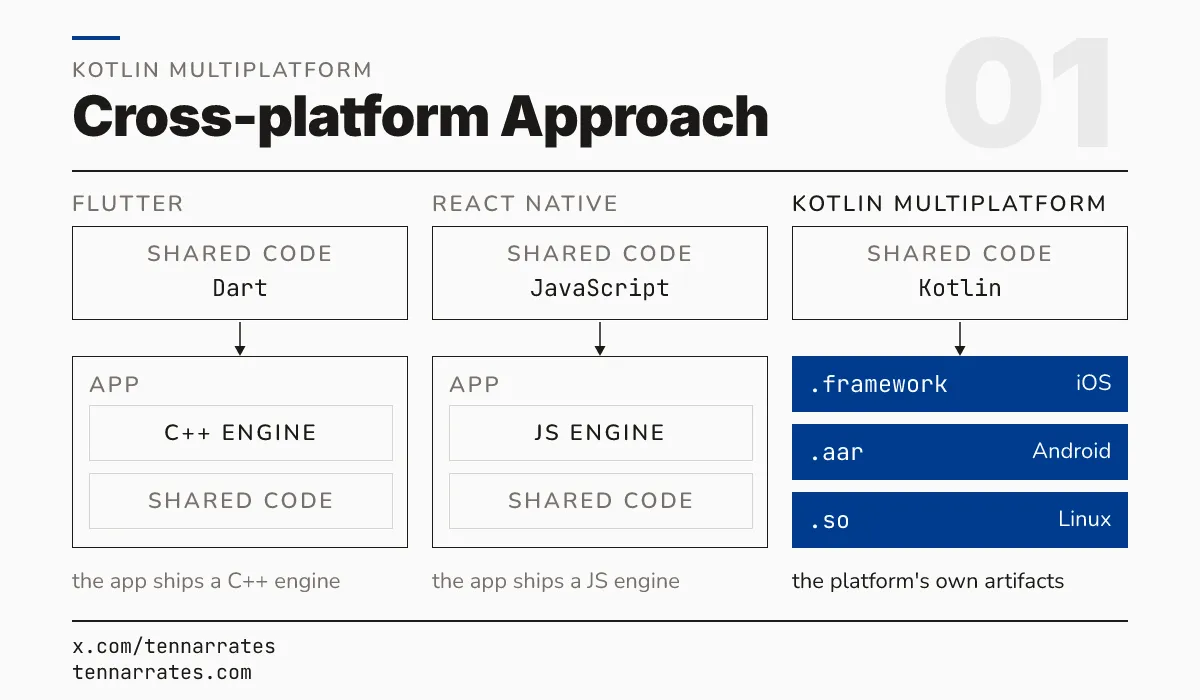
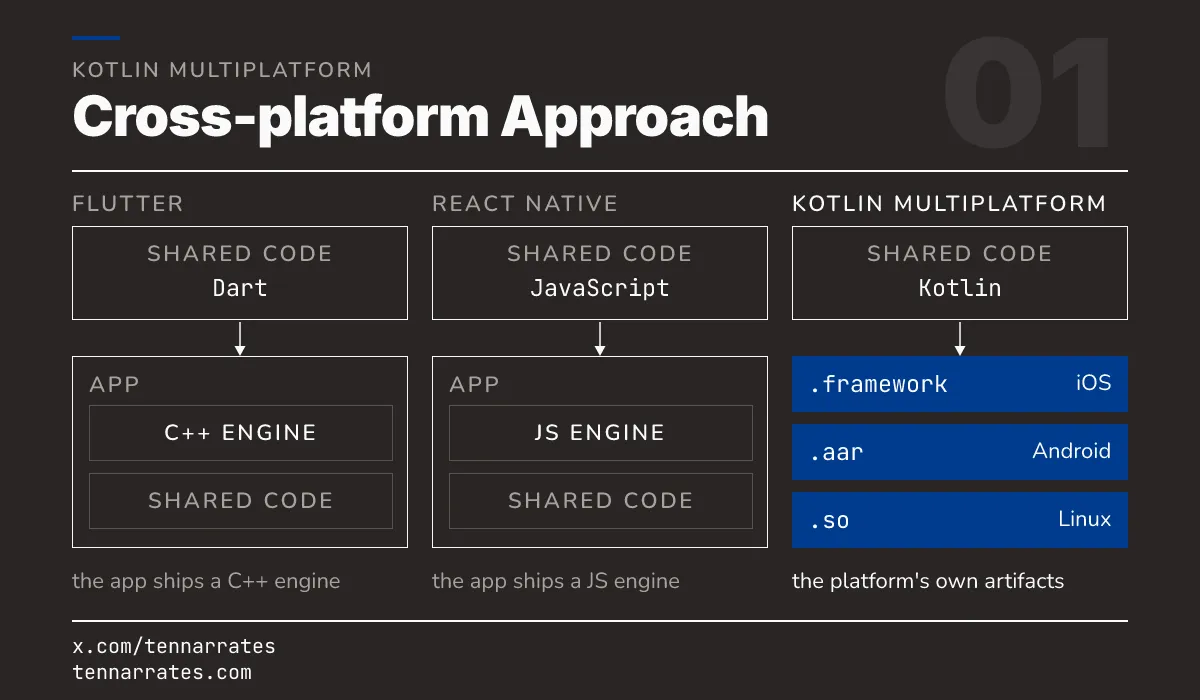
Flutter and React Native are frameworks. They share code by shipping a custom engine inside the app. This engine acts as a middle layer between the shared code and the device.
A Flutter app carries the Flutter engine. This engine includes a C++ core and a Dart runtime. It also includes its own renderer, which draws every pixel on the screen manually. The app does not use the native buttons or text fields of the OS. Instead, it uses the engine to mimic how those elements look. Because the app brings its own renderer, it looks the same on every device, but it does not feel native. The way a list scrolls or a button bounces is an imitation of the OS, not the OS itself. This means that if Apple updates the visual style of a button in a new iOS version, Flutter apps will not see that change until the Flutter engine is updated to mimic the new style.
A React Native app carries a JavaScript engine, such as Hermes. It also uses a C++ renderer called Fabric. The JavaScript code tells the engine what to do, and the engine then communicates with the native platform to create the UI. While this uses native components, the communication between the JavaScript engine and the native side creates a bridge. This bridge can become a performance bottleneck when the app needs to move a lot of data quickly, such as during a complex animation or when processing a large list of items. The bridge must serialize and deserialize data as it moves between the JavaScript world and the native world, which adds latency to every interaction.
In both cases, the “platform” travels with the app. The shared code does not run directly on the device’s own runtime. It runs on the engine that the framework provided. This adds significant size to the app binary and creates a layer of overhead. If the engine has a bug or a performance limit, the app inherits that limit. The developer is not just writing an app; they are shipping a runtime that hosts an app.
What is a platform?
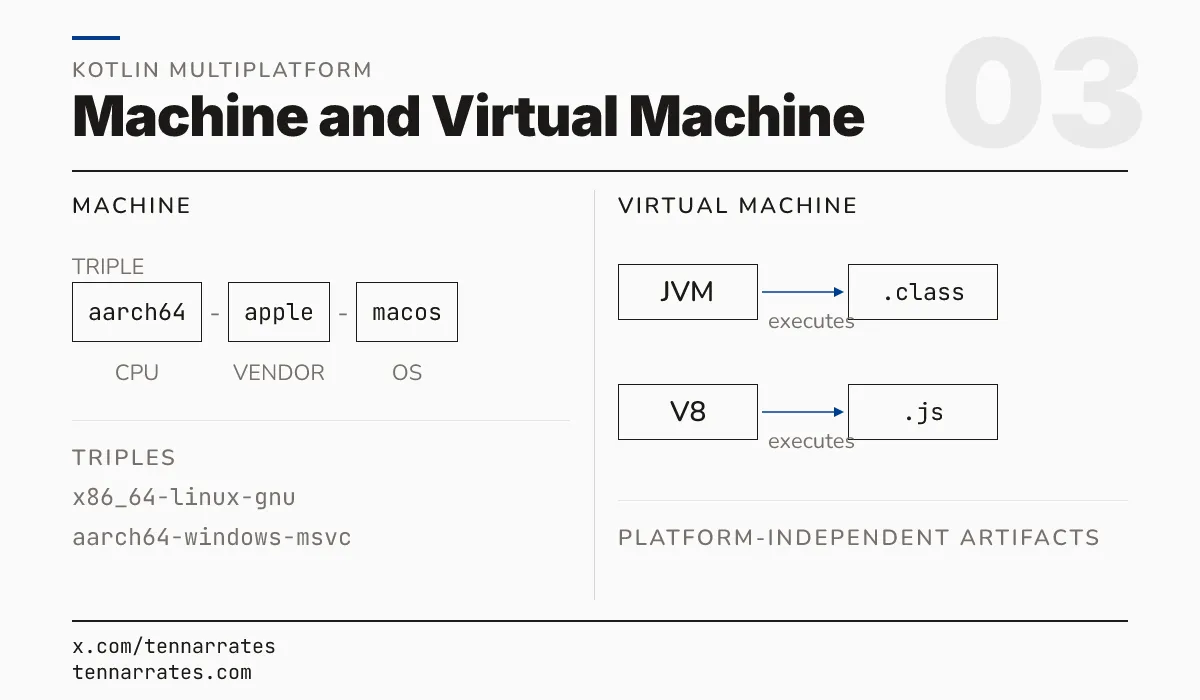
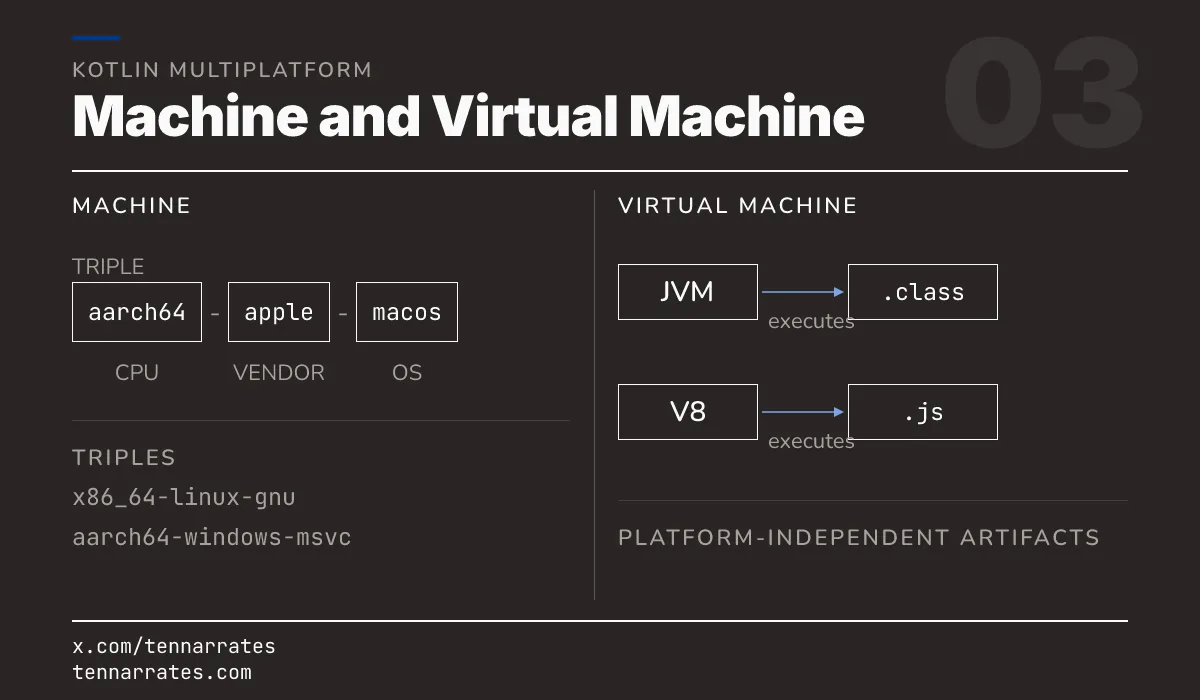
To see why this matters, you must define what a platform is. A platform is the combination of a runtime and the file formats it accepts.
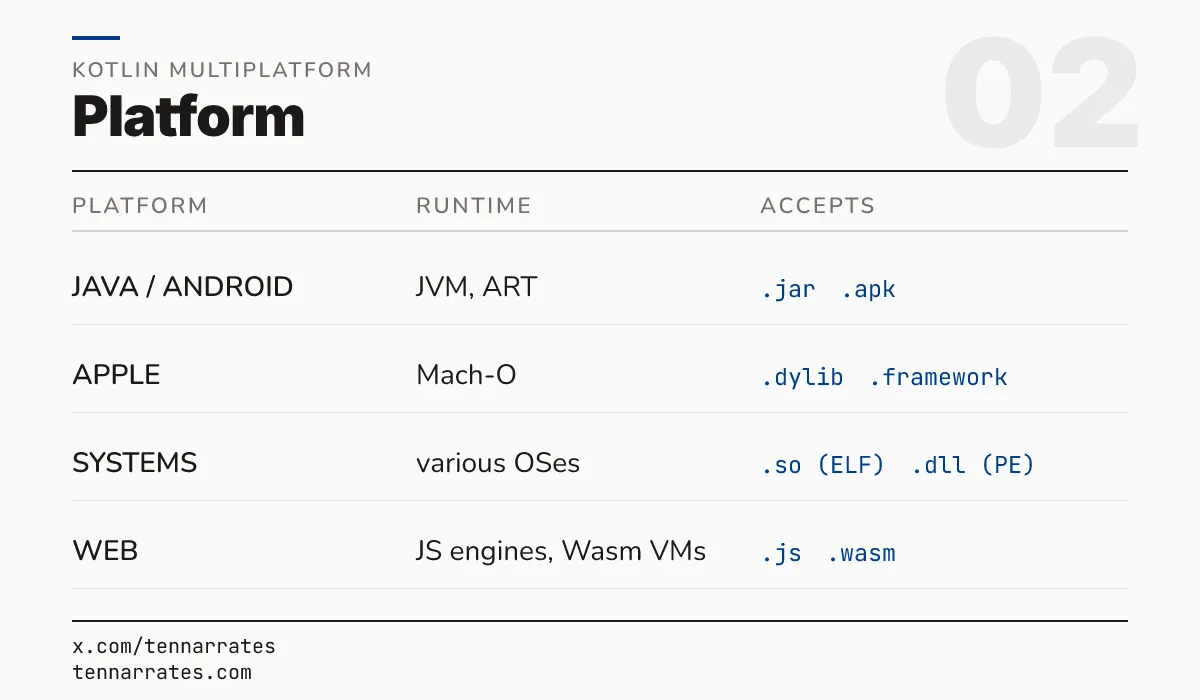
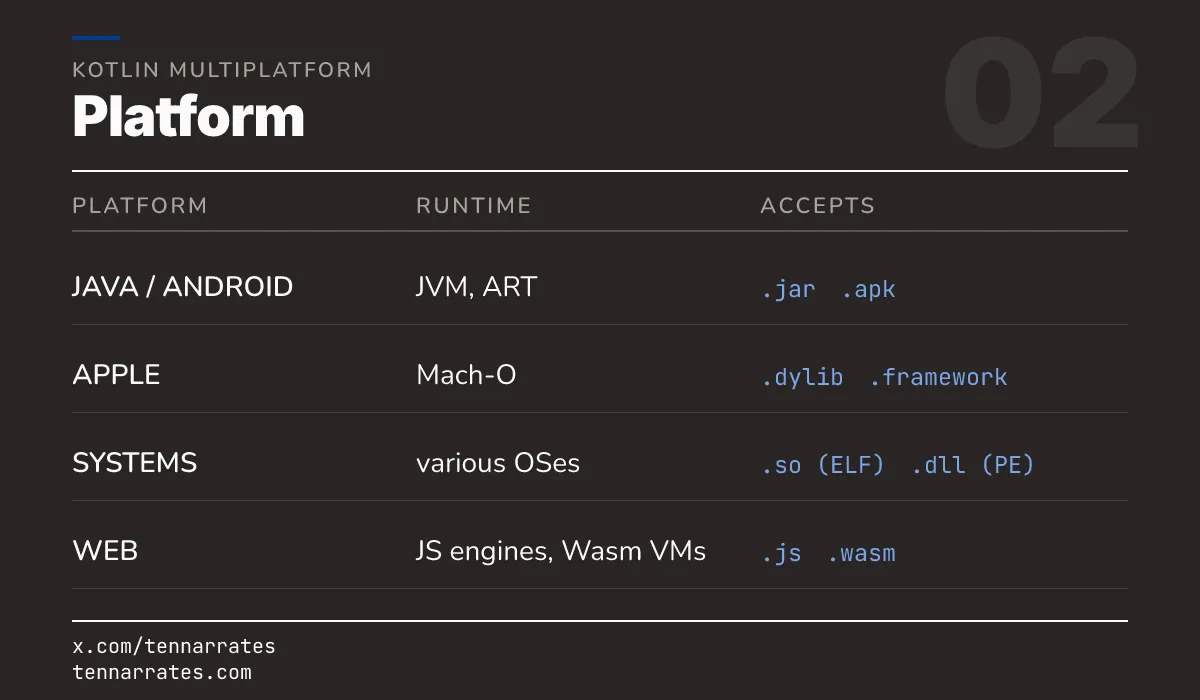
A virtual machine is a software layer that executes platform-independent artifacts. The Java Virtual Machine (JVM) is a virtual machine. It executes .class files. These files contain bytecode, which is a set of instructions that the JVM understands. The JVM handles the translation of this bytecode into instructions the local CPU can execute. This allows the same .class file to run on any device that has a JVM installed, regardless of the underlying hardware. The V8 engine is another virtual machine. It executes JavaScript files. It transforms the script into machine code at runtime to keep the app fast, a process known as Just-In-Time (JIT) compilation.
A physical machine is a specific CPU and OS combination. Developers often call this a triple. For example, aarch64-apple-macos describes an ARM64 CPU running macOS. These machines do not run bytecode. They run native binaries. These binaries are sets of instructions that the CPU can execute directly without any translation layer. This is the fastest way to run code because there is no middleman between the program and the processor.
Apple machines use the Mach-O file format for these binaries. Linux machines use the ELF format. Windows machines use the PE format. Each format tells the OS loader how to place the code in memory and how to link it to other libraries. When the OS starts a program, the loader reads these headers to determine which memory addresses the code should occupy and which system libraries it needs to function.
How Kotlin Multiplatform works
KMP achieves this by using a sophisticated compiler pipeline. It does not try to hide the platform. Instead, it embraces the fact that every platform is different.
First, the developer defines a target. A target is a specific machine or virtual machine that the project compiles for. For example, a project might have targets for the JVM, iOS, and the Web. Each target has its own source set. This allows the developer to write common code for all targets and platform-specific code where it is needed. The common source set is the heart of the project, containing the business logic that is the same everywhere, such as data validation or network request logic.
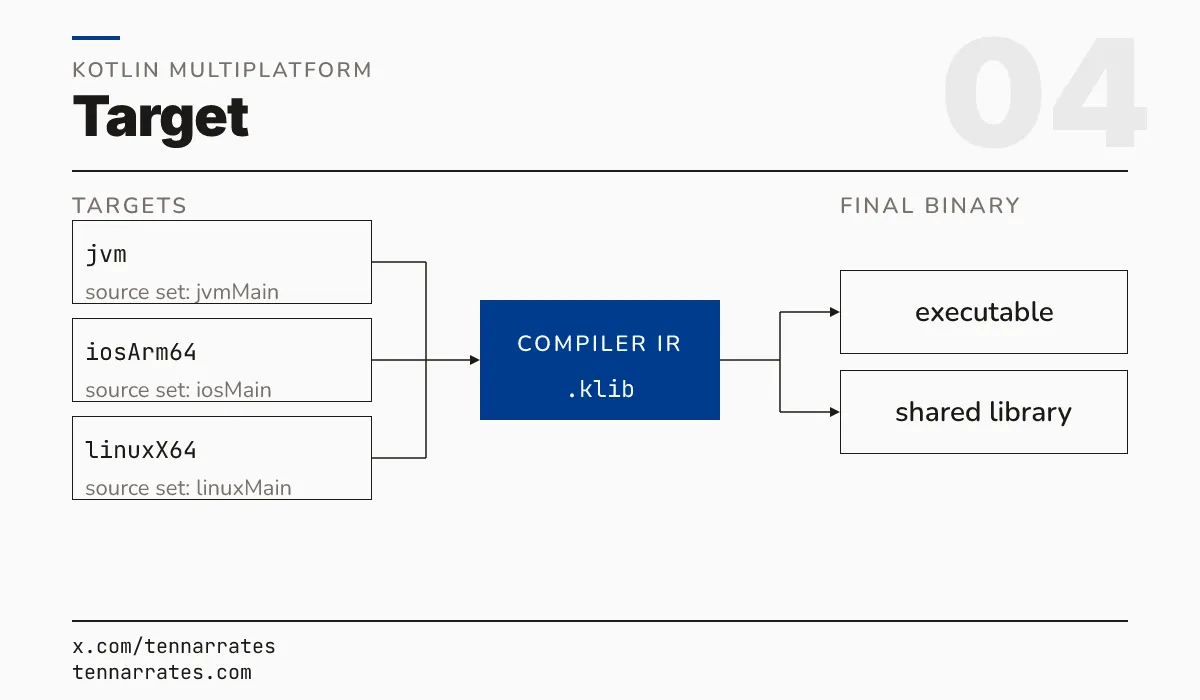
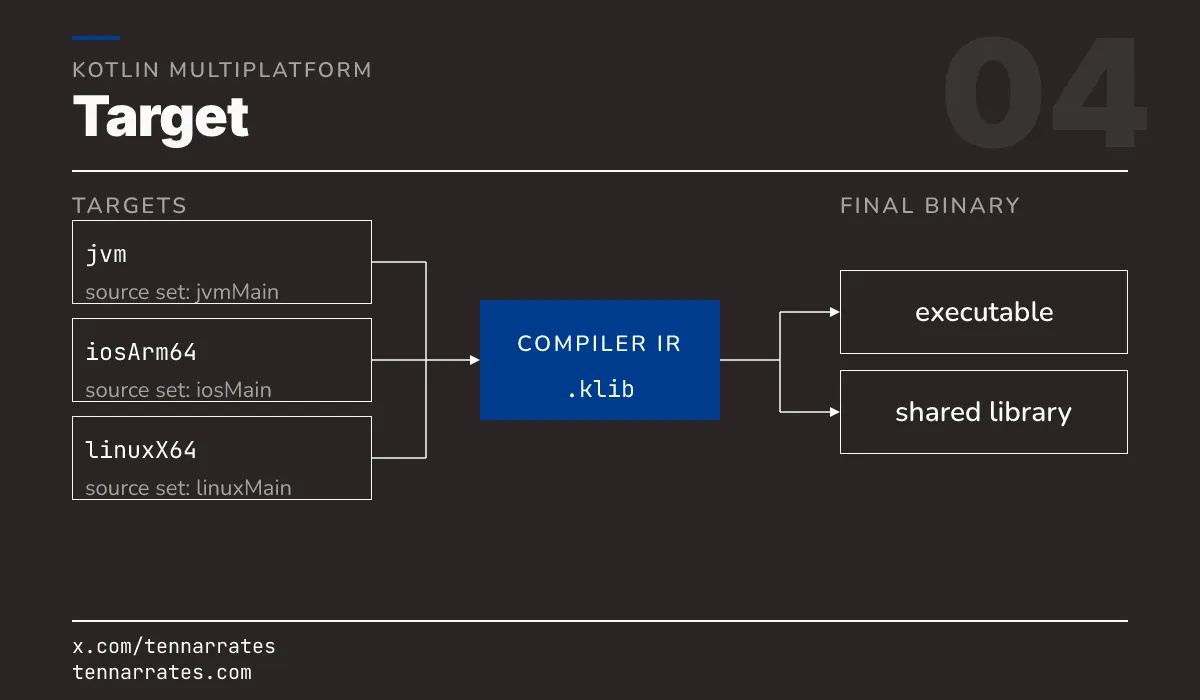
The frontend produces a unified Intermediate Representation (IR). The IR is a data structure that describes the logic of the code. It is not yet machine code or bytecode. It is a neutral form that captures the intent of the program. This IR is the key to multiplatform support because it allows the compiler to analyze the code once and then generate different outputs from that same analysis. Instead of writing a full compiler for every platform, JetBrains wrote one frontend that produces a universal IR.
The IR is then passed to a backend. There is a different backend for each platform family.
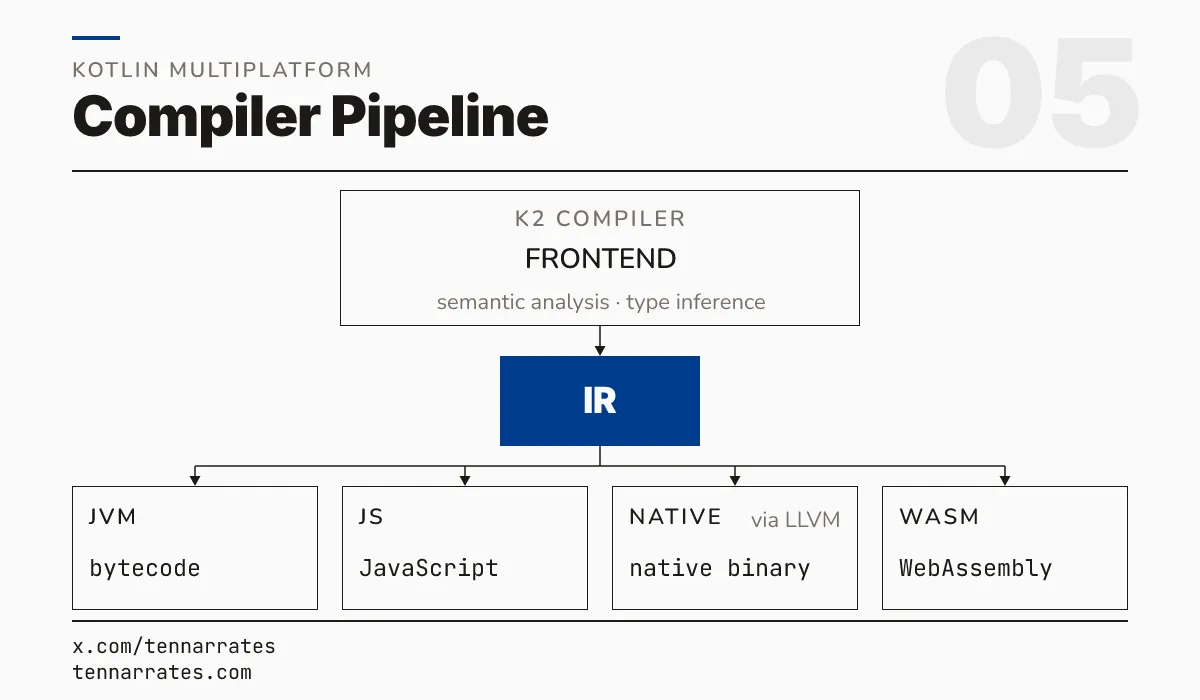
Because the compiler produces the specific format each platform expects, the resulting code runs as a first-class citizen. It does not need a translation layer. It does not need a custom engine. It is just another native library or executable. If you compile a KMP library for iOS, it becomes a framework that an iOS developer can import into Xcode just like any other Apple library. The iOS developer does not even need to know that the library was written in Kotlin.
The evidence
You can see this mechanism in action by looking at the artifacts produced from a single shared source set. In KMP, developers use expect and actual declarations to handle platform differences.
The common code declares what a function should do using the expect keyword. For example, the common code might expect a function that returns the name of the platform. The common code does not know how to get this name because every OS does it differently. The expect declaration acts as a contract. It tells the compiler that every target must provide an implementation for this function before the project can be built.
Each platform source set then provides the actual implementation. The iOS source set uses Apple’s APIs to get the name. The Android source set uses Android’s APIs. The compiler merges these declarations. For each target, it generates one declaration with the actual implementation for that platform. This allows the common code to call the function without knowing which platform it is running on. This mechanism allows KMP to be truly native because it uses the real APIs of the platform instead of a generic wrapper.
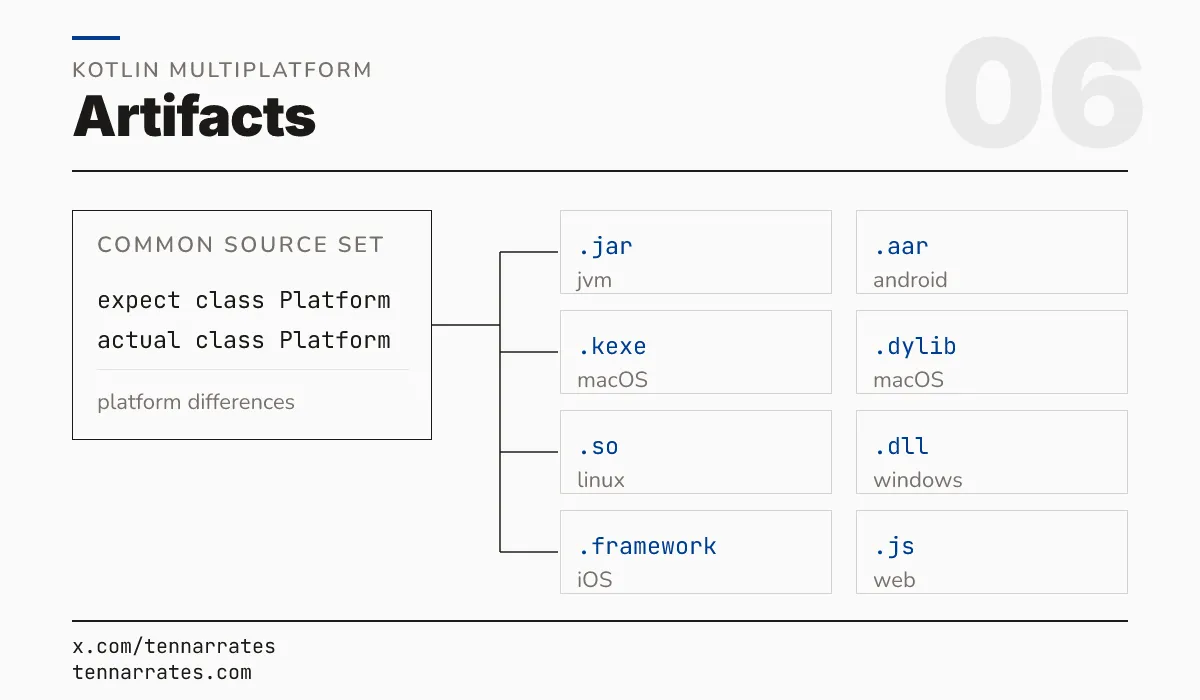
If you inspect these files, you find that they are not “KMP files”. They are the exact formats the OS loader expects.
  build/bin/macosArm64/debugExecutable/what-is-multiplatform.kexe:    Mach-O 64-bit executable arm64
  build/bin/macosArm64/debugShared/libwhat_is_multiplatform.dylib:    Mach-O 64-bit dynamically linked shared library arm64
  build/bin/linuxX64/debugShared/libwhat_is_multiplatform.so:         ELF 64-bit LSB shared object, x86-64, version 1 (SYSV), dynamically linked
  build/bin/mingwX64/debugShared/what_is_multiplatform.dll:           PE32+ executable (DLL) (GUI) x86-64, for MS Windows
  build/bin/iosArm64/debugFramework/what_is_multiplatform.framework/what_is_multiplatform:  Mach-O 64-bit dynamically linked shared library arm64
  build/bin/watchosArm64/debugFramework/what_is_multiplatform.framework/what_is_multiplatform: Mach-O dynamically linked shared library arm64_32_v8
  build/bin/tvosArm64/debugFramework/what_is_multiplatform.framework/what_is_multiplatform:  Mach-O 64-bit dynamically linked shared library arm64
These artifacts are native. A .jar file runs on the JVM. A .kexe runs on macOS. A .js file runs in Node.js. They do not require a KMP runtime to be present on the device. This is the core difference between KMP and other cross-platform tools. KMP disappears after the build is finished. The shared code is transformed into the native language of the target, leaving no trace of the compiler in the final app.
  Hello from JVM
  Hello from Kotlin/Native
  Hello from JavaScript
The internal structure of these artifacts also matches the platform’s requirements. An Android .aar file contains the manifest and classes the Android system needs. An iOS .framework contains the Objective-C headers and binaries that Xcode expects. This ensures that the shared code integrates perfectly with the rest of the native app. It can be called from Swift, Java, or JavaScript without any special glue code.
  R.txt  AndroidManifest.xml  classes.jar  META-INF/com/android/build/gradle/aar-metadata.properties
  GreetKt.class  Platform_jvmKt.class
  Headers  Info.plist  Modules  what_is_multiplatform
  abi_version=2.2.0  builtins_platform=JS  ir_signature_versions=1,2
True multiplatform
Kotlin Multiplatform is multiplatform in the true sense of the word. It follows a simple chain: one source, one IR, and many targets.
Most cross-platform tools try to solve the problem by creating a new, universal platform that they ship inside every app. This makes the app larger and separates the code from the host OS. It creates a world where the app is a guest on the device, relying on its own engine to survive.
KMP solves the problem by using the compiler to translate one language into many native forms. It allows developers to share business logic without sacrificing the advantages of native development. The app does not carry a foreign engine. It speaks the native language of the device. By targeting the runtime and binary formats of the platform, KMP removes the trade-off between sharing code and maintaining native performance.