KMP - Hello world!
What does it mean to write code for a “platform” today? Between native CPUs, virtual runtimes, and web browsers, software now faces an increasing number of machine types. Supporting many platforms for real takes good tooling. The tooling must manage the business logic, the platform boundaries, and the tests, from unit to end to end.
Kotlin Multiplatform (KMP) rethinks how we decompose systems. The business logic lives in a shared library, and that library compiles to the binary format each target requires. The platforms include Android, iOS, macOS, watchOS, Linux, Windows, and the web, as JavaScript, Wasm, or Node. Kotlin can also sit on top of a C or Rust library. This way, Kotlin becomes one more language the platform supports. This article defines the core terms, then walks a hello world from source to a running app. The project used in this article is available at github.com/dushyant30suthar/KMP-Themissingintroduction.
Core Definitions
Machine
A machine is a combination of a CPU and an operating system on which software can run.
- Native machine: Software targets a specific CPU and OS combination directly. As the number of combinations grew, software had to account for an increasing number of machine types.
- Virtual machine: A runtime such as the JVM, the Python runtime, or the Android runtime hides the machine from the code. The code targets the runtime, and the runtime handles the machines.
In both cases, the target was still fundamentally called a “machine”.
Platform
A browser introduces a new type of software target. A browser is neither a native machine nor a virtual machine. The term platform covers every kind of target: a machine, a runtime, or a browser.
Target
A target is an identifier that names a compilation target — it fixes the format of the binaries produced, the language constructs available, and the dependencies allowed.
Artifact
An artifact is any output that allows end-users or other software to consume your product.
- Library: An artifact consumed by another program. An SDK is a library plus tools and documentation for developers.
- Executable: An artifact launched by an environment to run a complete program. A user-facing executable is an app.
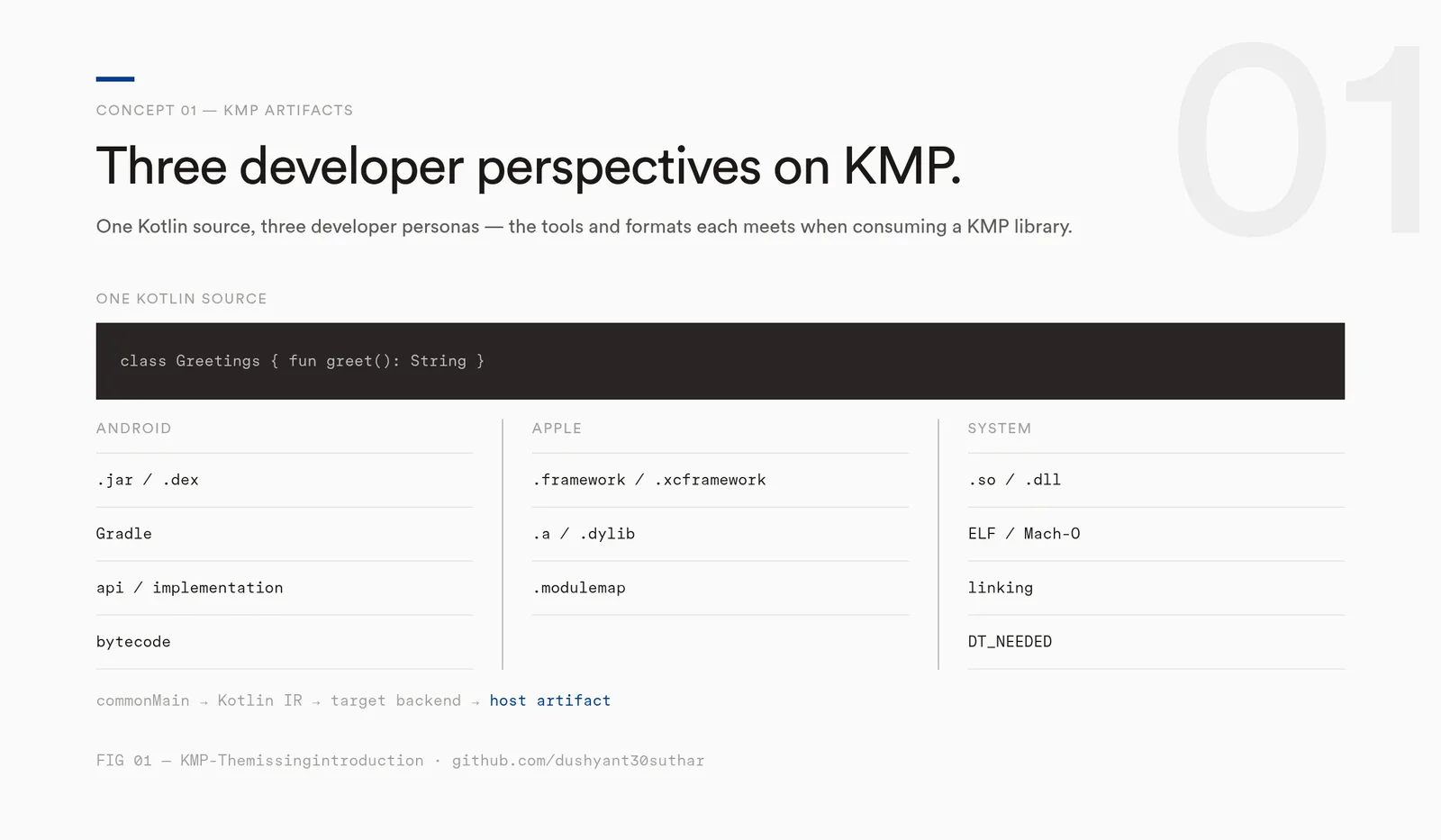
My architecture of a KMP project
Decomposing into libraries
The system decomposes into libraries. A library is a unit of software that another program can consume on its own. Each library keeps a clear API contract around it, so it hides its internals.
- The libraries connect through modules in the build tool (Gradle).
- Each module depends on the others only in the direction the architecture allows.
- Shared types move across the boundary.
This decomposition keeps evolving as the project is understood better.
The first target
Let's consider a single library module with one target: macosArm64.
A KMP project is defined by three Gradle files — two at the project root, one inside the module.
settings.gradle.kts (project root) declares the single module the project contains:
rootProject.name = "KMP-Themissingintroduction"

// ...

include(":greetings")
build.gradle.kts (project root) pins the Kotlin Multiplatform plugin through a version catalog:
plugins {
    alias(libs.plugins.kotlinMultiplatform) apply false
}
greetings/build.gradle.kts (the greetings module) says which target it points at and what binary it produces — a static Greetings.framework for Apple Silicon Macs:
plugins {
    alias(libs.plugins.kotlinMultiplatform)
}

kotlin {
    macosArm64().binaries.framework {
        baseName = "Greetings"
        isStatic = true
    }

    sourceSets {
        commonMain.dependencies {
        }
        // ...
    }
}
Now, lets talk about plain Xcode app — a SwiftUI app under apps/apple/greetings, with a standard app entry point and a single view.
The whole project is therefore two things: the shared Kotlin library, and the native macOS app that consumes it.
The project's files:
.
├── apps
│   └── apple
│       └── greetings
│           ├── greetings
│           │   ├── ContentView.swift
│           │   └── greetingsApp.swift
│           └── greetings.xcodeproj
├── greetings
│   ├── src
│   │   └── commonMain
│   │       └── kotlin
│   │           └── com
│   │               └── theemergentnarrative
│   │                   └── kmpthemissingintroduction
│   │                       └── Greetings.kt
│   └── build.gradle.kts
├── build.gradle.kts
├── gradle
│   └── libs.versions.toml
├── gradle.properties
├── gradlew
├── gradlew.bat
└── settings.gradle.kts
The library module and the Xcode app live side by side in the one project:
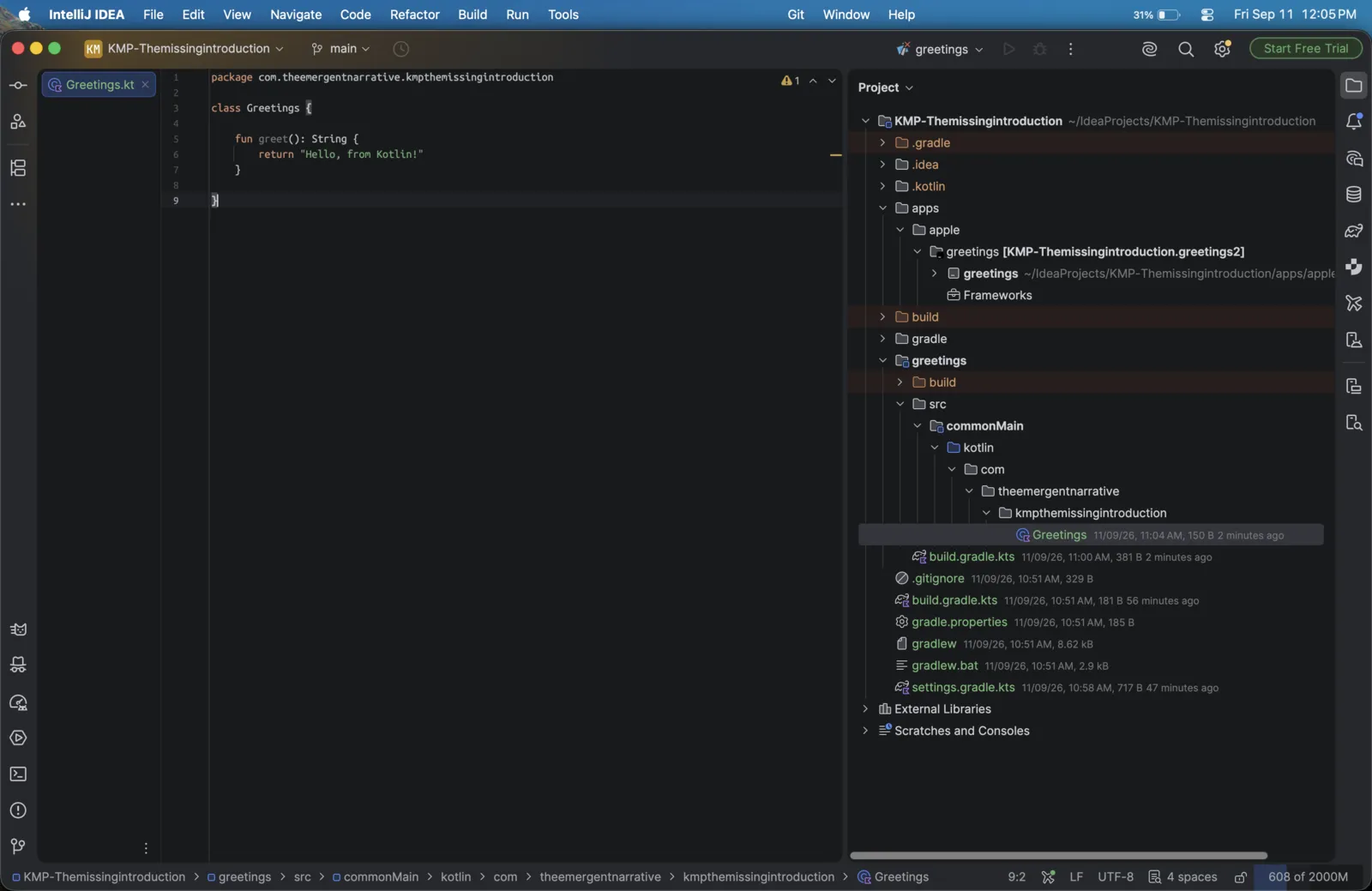
Source sets
With gradle we have commonMain as module source sets, there're others too that we will discuss in next article when we introduce more targets and platfroms:
- commonMain: holds code that every target shares. The whole library for this project is one file in commonMain:
greetings/src/commonMain/kotlin/com/theemergentnarrative/kmpthemissingintroduction/Greetings.kt.
package com.theemergentnarrative.kmpthemissingintroduction

class Greetings {
    fun greet(): String {
        return "Hello, from Kotlin!"
    }
}
Compile the library
Build
In IntelliJ, we can use the Gradle tool window, which lists the tasks: greetings → Tasks → build to compile the library.
We can also do it from the CLI:
./gradlew clean :greetings:buildThree outputs:
- commonMain compiles to Kotlin IR for the macosArm64 target.
- The default output, a .klib, is written. A .klib is a Kotlin library that other Kotlin tooling consumes. The machine cannot load it.
- Because the binaries block declares a framework, the compiler emits the final native binary: Greetings.framework, the library format that macOS apps link against.
The output file:
greetings/build/bin/macosArm64/releaseFramework/Greetings.frameworkThe output (trimmed) of the command:
> Task :greetings:compileKotlinMacosArm64
> Task :greetings:macosArm64MainKlibrary
> Task :greetings:compileTestKotlinMacosArm64 NO-SOURCE
> Task :greetings:linkDebugTestMacosArm64 NO-SOURCE
> Task :greetings:macosArm64Test SKIPPED
> Task :greetings:allTests NO-SOURCE
> Task :greetings:check UP-TO-DATE
> Task :greetings:linkDebugFrameworkMacosArm64
> Task :greetings:linkReleaseFrameworkMacosArm64
> Task :greetings:assemble
> Task :greetings:build

BUILD SUCCESSFUL
The binary
The framework contains machine code for this CPU and OS. The compiler translated the Kotlin into the form the platform already understands. The file command asks what the framework is:
file greetings/build/bin/macosArm64/releaseFramework/Greetings.framework/Greetings
current ar archive random library
Past this point, provenance no longer matters.
Inside the framework bundle, the binary is an ordinary static archive of Mach-O object code with an Objective-C header — the linker consumes it exactly as it would a Swift-authored static framework. Kotlin is just another compiler targeting this machine.
For this hello world we build a single Greetings.framework for one target. In real-world projects, libraries and SDKs are shipped as .xcframework bundles — one framework per architecture and platform. When we add more targets, we'll package the library as an .xcframework instead, and we'll cover static vs. dynamic binaries and frameworks and how they link. We go deeper on all of this in the distribution article.
Consume and run
The app comes next. A native macOS app in Swift links the framework and calls the code in commonMain:
import Greetings

// in ContentView
Text(Greetings().greet())
Kotlin exposes the Greetings class to Swift. Instantiating it and calling greet() returns the string produced in Kotlin.
Wiring the app to the library
Link the framework. In General → Frameworks, Libraries, and Embedded Content, press + → Add Other and pick Greetings.framework. That puts the framework on the target — the linker's instruction to bind it into the app.
Point the compiler at it. In Build Settings → Framework Search Paths, add the folder containing the framework:
$(PROJECT_DIR)/greetingsThat path lets the compiler resolve import Greetings. Because the framework is static, its object code compiles straight into the app binary — there is nothing to embed at runtime.
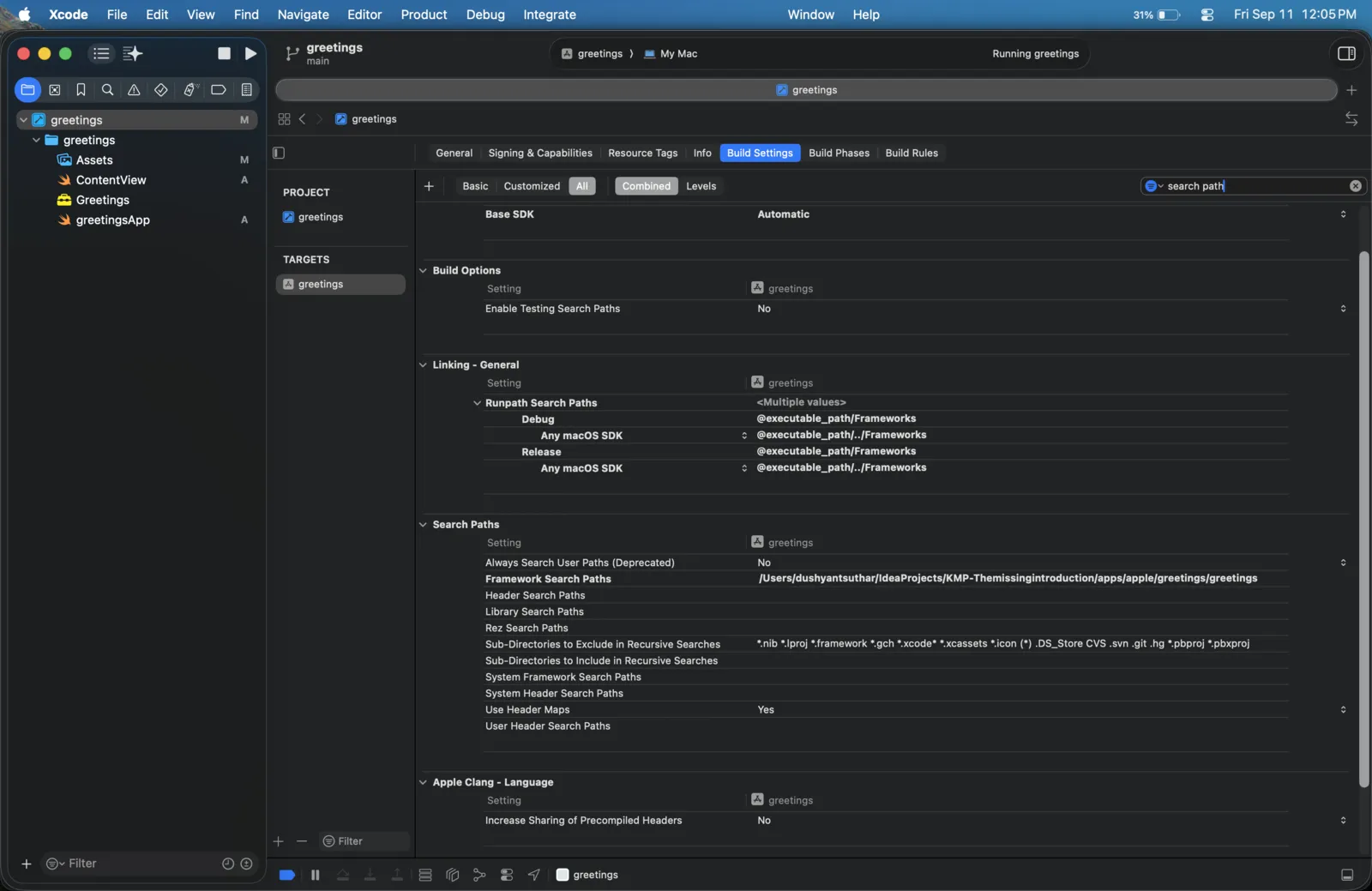
So the order is: Gradle builds the framework, Xcode links it. With the framework in place, select the greetings scheme and hit Run in Xcode. The app window shows:
Hello, from Kotlin!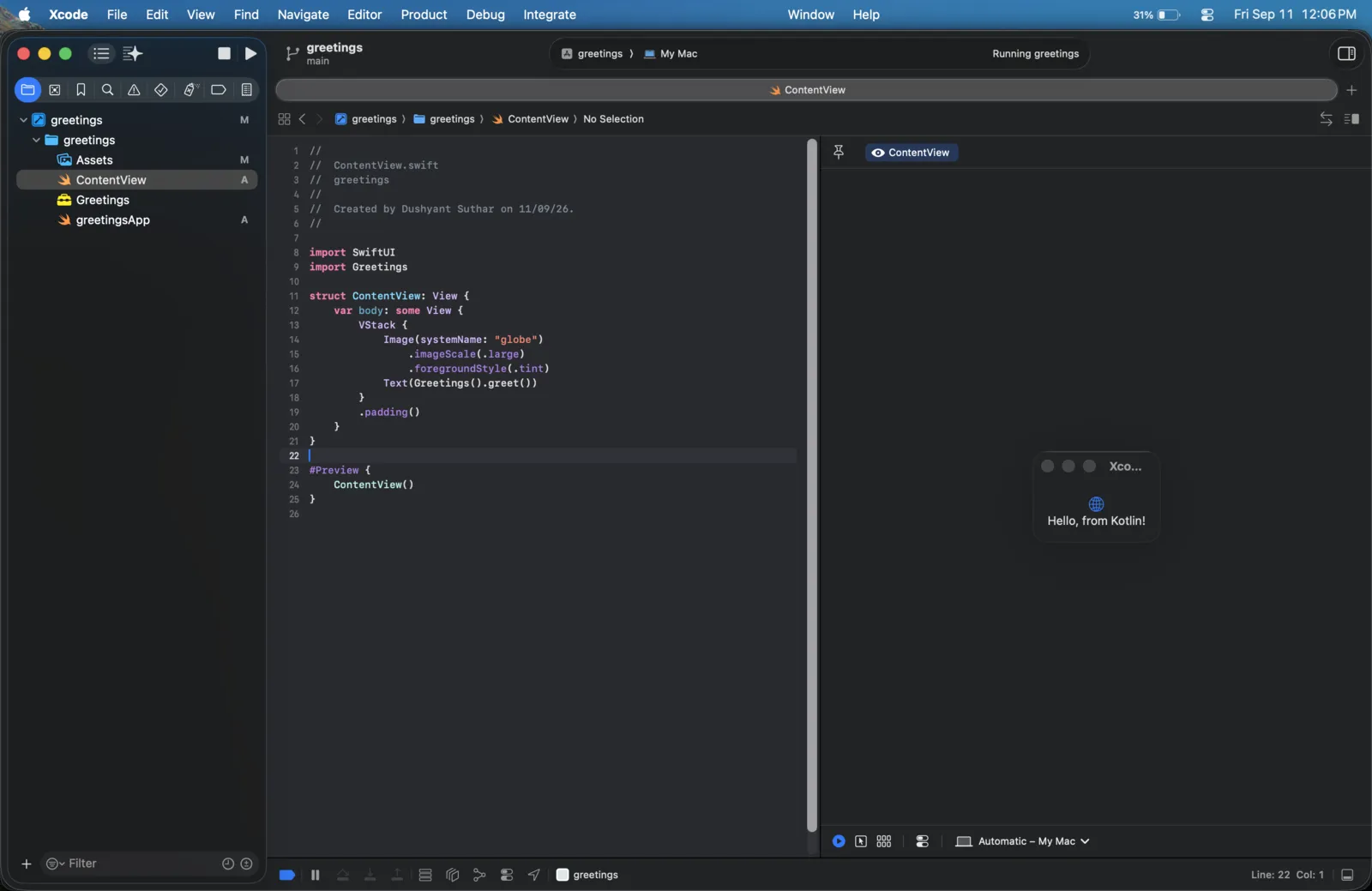
Native to the target
The library is native to the target it points at. Change the target, and the same commonMain code compiles to that platform's own artifact. Kotlin is the language, the target is the platform, and Kotlin Multiplatform is the tooling around the language for the platform.